Use with AI Agents
Give your AI agent everything it needs to explore, build, and operate AgentField autonomously.
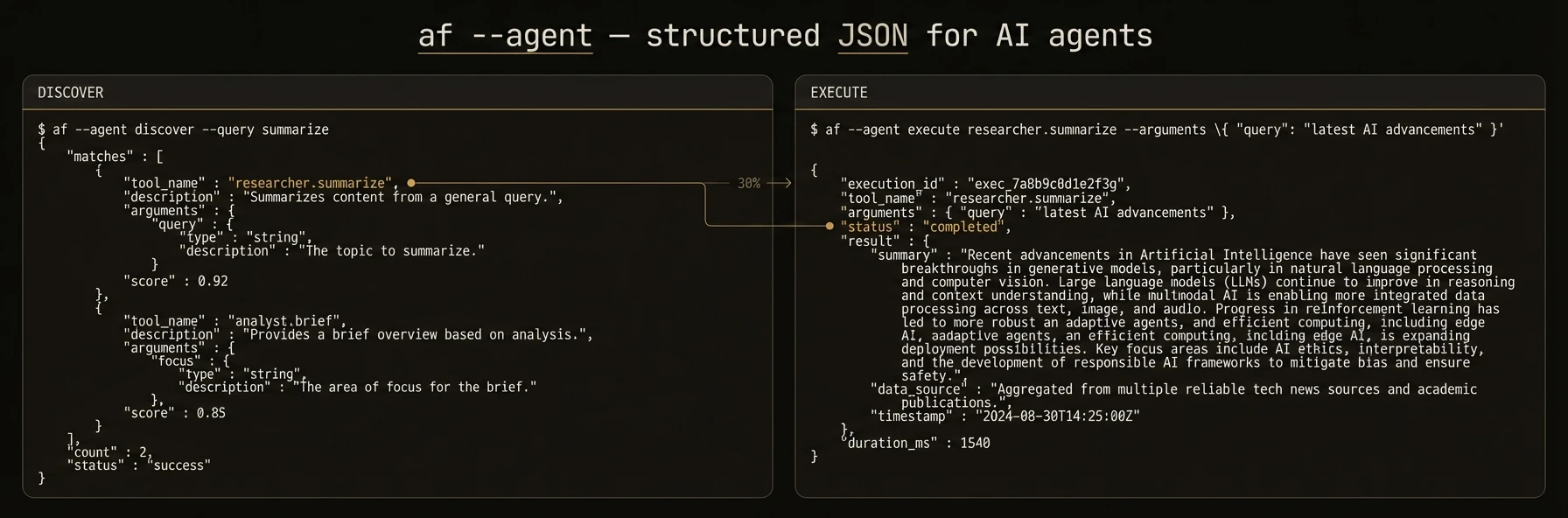
Let your AI agent build, deploy, and operate AgentField agents — no manual setup required.
AgentField is built for a world where AI agents write code, manage infrastructure, and operate systems. The CLI and REST API are designed so that tools like Claude Code, Cursor, Codex, and Gemini CLI can interact with AgentField directly.
This page provides copy-pasteable prompts you can hand to your AI agent to get started immediately.
Quick Setup: Give This to Your Agent
Copy the prompt below and paste it into your AI coding agent. It will install AgentField, scaffold a project, and start building.
For Claude Code / Cursor / Codex
## AgentField Setup

Install the AgentField CLI and scaffold a new agent project:

```bash
curl -fsSL https://agentfield.ai/get | sh
af init my-agent --defaults
cd my-agent && pip install -r requirements.txt
```

Start the control plane and your agent in two terminals:

```bash
af server          # Terminal 1 — Control plane at http://localhost:8080
python main.py     # Terminal 2 — Agent auto-registers
```

Test it:

```bash
curl -X POST http://localhost:8080/api/v1/execute/my-agent.demo_echo \
  -H "Content-Type: application/json" \
  -d '{"input": {"message": "Hello from my agent!"}}'
```

### Key concepts
- `@app.reasoner()` — LLM-powered function (uses `app.ai()` for structured output)
- `@app.skill()` — Deterministic tool (API calls, file ops, no LLM)
- `app.call("other-agent.func")` — Cross-agent communication
- `app.pause()` — Human-in-the-loop approval
- `app.memory.set/get` — Distributed key-value state

### References
- Full docs: https://agentfield.ai/llms-full.txt
- Python SDK: https://agentfield.ai/docs/reference/sdks/python
- REST API: https://agentfield.ai/docs/reference/sdks/rest-api
- CLI Reference: https://agentfield.ai/docs/reference/sdks/cli
Explore an Existing AgentField Deployment
If you already have AgentField running and want your AI agent to explore it, paste this:
## Explore AgentField Control Plane

The AgentField control plane is running at http://localhost:8080.

### Discover what's available

```bash
# List all registered agents and their capabilities
curl -s http://localhost:8080/api/v1/discovery/capabilities \
  -H "Authorization: Bearer $AGENTFIELD_API_KEY" | jq .

# Search for specific capabilities (AI-native endpoint)
curl -s "http://localhost:8080/api/v1/agentic/discover?q=summarize" \
  -H "Authorization: Bearer $AGENTFIELD_API_KEY" | jq .

# Get platform status
curl -s http://localhost:8080/api/v1/agentic/status \
  -H "Authorization: Bearer $AGENTFIELD_API_KEY" | jq .

# Unified resource query
curl -s -X POST http://localhost:8080/api/v1/agentic/query \
  -H "Authorization: Bearer $AGENTFIELD_API_KEY" \
  -H "Content-Type: application/json" \
  -d '{"resource": "agents", "limit": 20}'
```

### Execute an agent function

```bash
# Synchronous execution
curl -s -X POST http://localhost:8080/api/v1/execute/<agent-id>.<function-name> \
  -H "Authorization: Bearer $AGENTFIELD_API_KEY" \
  -H "Content-Type: application/json" \
  -d '{"input": {"key": "value"}}'

# Async execution (returns immediately with execution_id)
curl -s -X POST http://localhost:8080/api/v1/execute/async/<agent-id>.<function-name> \
  -H "Authorization: Bearer $AGENTFIELD_API_KEY" \
  -H "Content-Type: application/json" \
  -d '{"input": {"key": "value"}}'
```

### Check execution status

```bash
curl -s http://localhost:8080/api/v1/executions/<execution_id> \
  -H "Authorization: Bearer $AGENTFIELD_API_KEY" | jq .
```

### Full reference
- REST API: https://agentfield.ai/docs/reference/sdks/rest-api
- Machine-readable docs: https://agentfield.ai/llms-full.txt
CLI Agent Mode
The AgentField CLI has a dedicated agent subcommand that switches all output to structured JSON — no colors, no tables, no interactive prompts. This is how AI agents should operate the control plane from a terminal.
Give this to your agent for CLI-based operation
## Operating AgentField via CLI

Use the `af` CLI with the `agent` subcommand for machine-readable JSON output.

```bash
# Check system health
af agent status

# Discover all registered agents and their endpoints
af agent discover

# List all agents
af list

# Execute a reasoner
curl -s -X POST http://localhost:8080/api/v1/execute/my-agent.summarize \
  -H "Content-Type: application/json" \
  -d '{"input": {"text": "Quarterly earnings report..."}}'

# Check execution status
curl -s http://localhost:8080/api/v1/executions/<execution_id> | jq .status

# View agent configuration
af config my-agent
```

All commands return structured JSON. Parse with `jq` or your language's JSON library.

### Connecting to a remote control plane

```bash
af agent --server https://my-agentfield.example.com --api-key $KEY status
```

### Full CLI reference
- https://agentfield.ai/docs/reference/sdks/cli
Build a Multi-Agent System
For agents that need to build more complex systems, paste this extended prompt:
## Building a Multi-Agent System with AgentField

### Architecture
AgentField agents are microservices that communicate through a shared control plane.
Each agent registers its capabilities (reasoners and skills), and any agent can call
any other agent's functions via `app.call()`.

### Create two agents that work together

**Agent 1: Researcher** — fetches and summarizes information

```python
from agentfield import Agent, AIConfig
from pydantic import BaseModel

app = Agent(node_id="researcher", agentfield_server="http://localhost:8080", ai_config=AIConfig(model="anthropic/claude-sonnet-4-20250514"))

class Summary(BaseModel):
    title: str
    key_points: list[str]
    confidence: float

@app.reasoner(tags=["research"])
async def summarize(text: str) -> dict:
    result = await app.ai(
        system="Extract key points from the given text.",
        user=text,
        schema=Summary,
    )
    return result.model_dump()

app.run()
```

**Agent 2: Reporter** — calls the researcher and formats output

```python
from agentfield import Agent

app = Agent(node_id="reporter", agentfield_server="http://localhost:8080")

@app.reasoner(tags=["reporting"])
async def generate_report(topic: str) -> dict:
    # Call the researcher agent through the control plane
    research = await app.call("researcher.summarize", text=topic)

    # Use shared memory to store the report
    await app.memory.set(f"report:{topic}", research)

    return {"report": research, "stored": True}

app.run()
```

### Run both agents

```bash
af server                      # Terminal 1
python researcher.py           # Terminal 2
python reporter.py             # Terminal 3
```

### Call the reporter (which internally calls the researcher)

```bash
curl -X POST http://localhost:8080/api/v1/execute/reporter.generate_report \
  -H "Content-Type: application/json" \
  -H "Authorization: Bearer $AGENTFIELD_API_KEY" \
  -d '{"input": {"topic": "The impact of autonomous agents on software engineering"}}'
```

### Key patterns
- `app.call("agent.function")` — Cross-agent RPC through the control plane
- `app.memory.set/get` — Shared state across agents
- `app.pause()` — Suspend execution for human approval
- `app.harness(prompt)` — Dispatch to coding agents (Claude Code, Codex, Cursor)

### References
- Python SDK: https://agentfield.ai/docs/reference/sdks/python
- Full docs: https://agentfield.ai/llms-full.txt
Machine-Readable Documentation
AgentField publishes its full documentation in machine-readable formats that AI agents can consume directly:
| Resource | URL | Use case |
|---|---|---|
| Full docs corpus | https://agentfield.ai/llms-full.txt | Complete context for any AI agent |
| Docs manifest | https://agentfield.ai/docs-ai.json | Structured metadata for all pages |
| Summary index | https://agentfield.ai/llms.txt | Quick overview with key links |
| Per-page markdown | https://agentfield.ai/llm/docs/<slug> | Individual page content |
Point your AI agent to https://agentfield.ai/llms-full.txt for complete documentation context. This file is kept in sync with every docs change and contains all SDK references, architecture guides, and examples.
Add AgentField context to Claude Code
Add this to your project's CLAUDE.md:
## AgentField Reference

This project uses AgentField for AI agent infrastructure.
- Full docs: https://agentfield.ai/llms-full.txt
- Python SDK: https://agentfield.ai/docs/reference/sdks/python
- REST API: https://agentfield.ai/docs/reference/sdks/rest-api
Add AgentField context to Cursor
Add to .cursorrules:
When working with AgentField agents, reference https://agentfield.ai/llms-full.txt
for the complete API and SDK documentation.